
Table of Contents
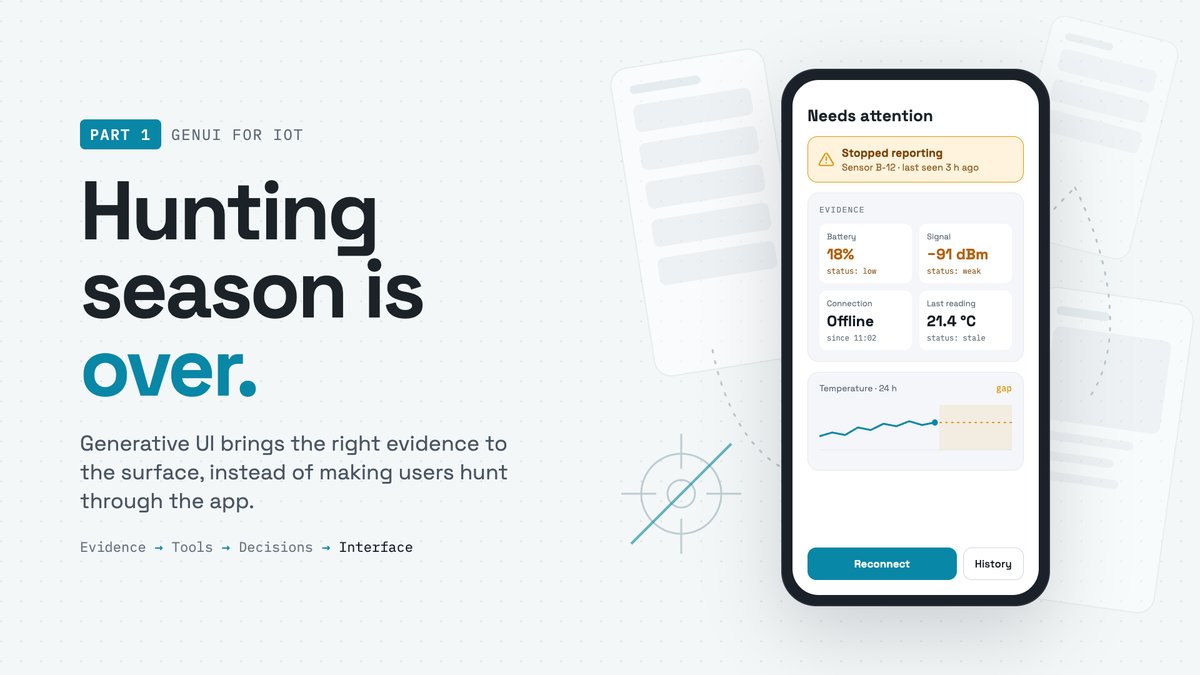
GenUI ends the evidence hunt.
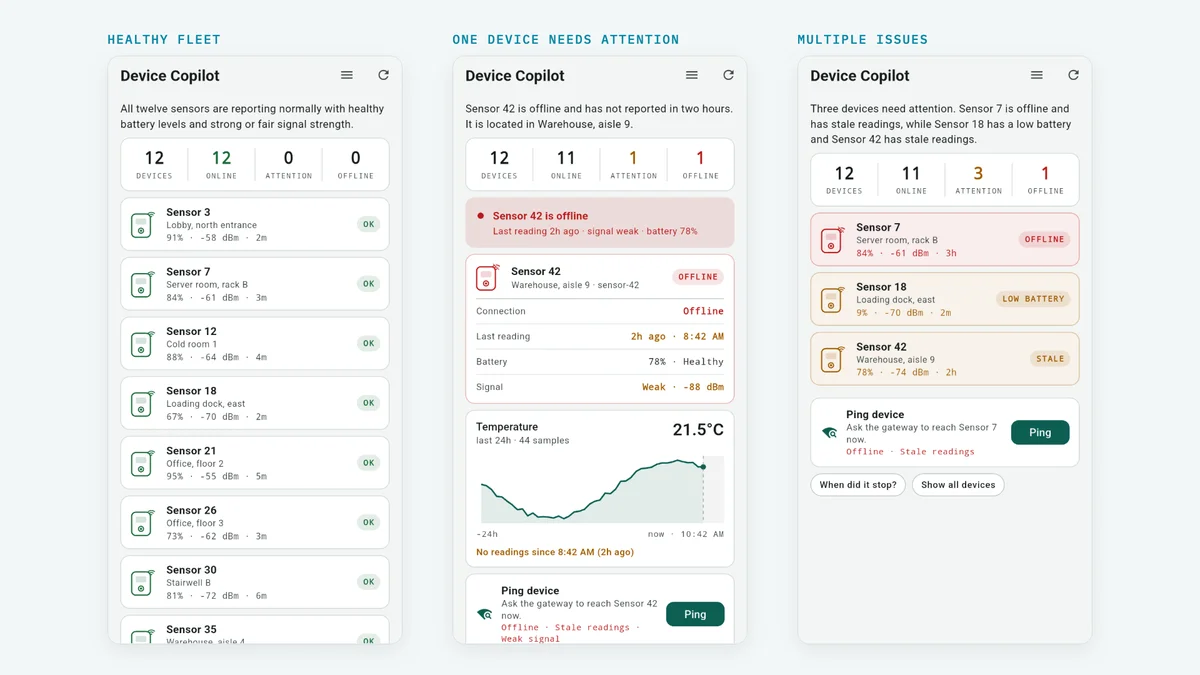
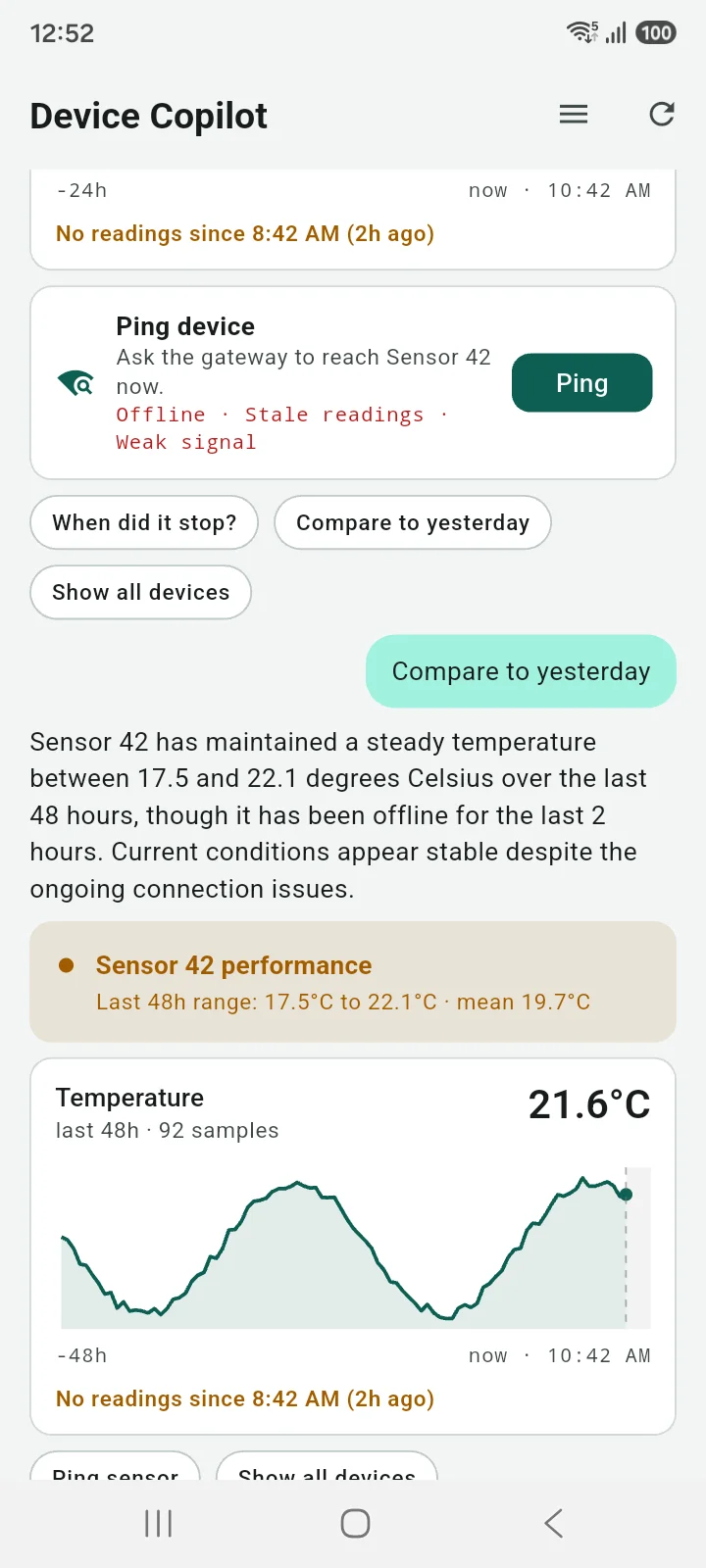
The three screenshots above come from the same Flutter app, on the same screen. What changes is not the code running on the device, but the evidence available at runtime and the interface the agent composes around it.
This is more than a chatbot with widgets. In a typical IoT experience, users need to know where to look. They open the device list, drill into a sensor, check battery and connectivity, open charts, compare timestamps, and gradually assemble the evidence themselves.
With GenUI, the app can bring that evidence to the surface first.
The user no longer has to navigate the app to get the right view; it is composed for the situation.
The shift is from navigation-first to evidence-first interaction.
What Generative UI Means Here
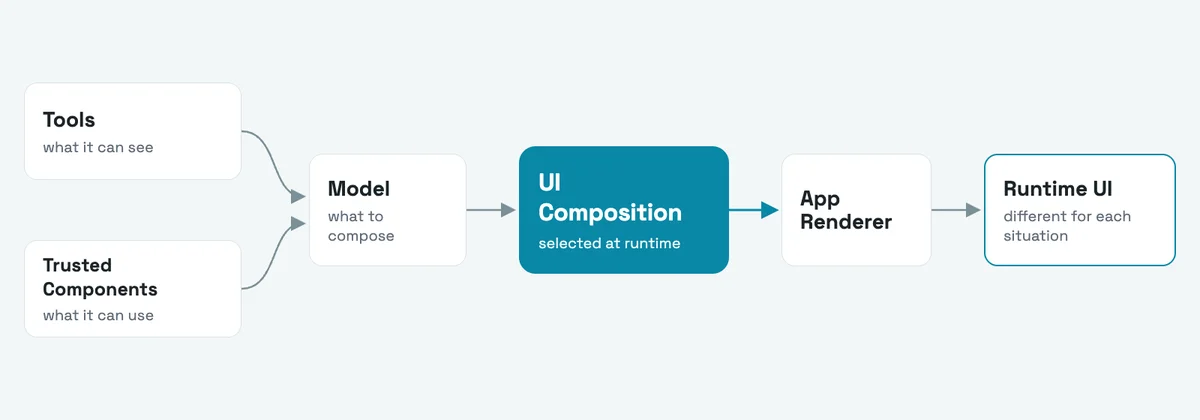
Not AI-generated pixels. Not AI-generated code. A model composing trusted UI building blocks at runtime.
The important distinction is that the model is not inventing the interface from scratch. You, as the developer, define the components it is allowed to use: cards, charts, status banners, device pickers, actions, and other domain-specific building blocks.
At runtime, the agent decides which of those components are useful for the current situation, how they should be arranged, and which evidence deserves attention.
In that sense, Generative UI is less about generating UI and more about generating composition.
The application still owns the design system, interaction patterns, business rules, and rendering code. The model operates inside those boundaries, turning the same set of trusted components into different interfaces depending on what is happening.
For IoT, this matters because the relevant interface is rarely static. A healthy fleet, a low-battery sensor, and a device that suddenly stopped reporting may require completely different views, even if they all start from the same screen.
Demo: Same App, Different Evidence
The fleet data in this demo is simulated. The app, components, and GenUI flow are real.
What matters here is the behavior: as the available evidence changes, the agent can retrieve what is relevant and recompose the interface around the situation.
We put the same app in front of three different fleet scenarios:
- Healthy fleet
- One device needs attention
- Multiple issues
Give the Agent a Better Vocabulary
The model can only be as expressive as the components you give it.
If all it has is text, buttons, and generic cards, every situation starts to look the same. The agent may understand what is happening, but it has a limited way to communicate that understanding.
Domain-specific components give it a richer vocabulary.
In an IoT app, that might mean components such as DeviceStatusCard, DeviceChart, DevicePicker, or a connectivity banner. These components already know how your product should represent device state, measurements, warnings, and actions.
The model does not need to invent those patterns. It only needs to choose the right ones for the current situation.
A better component catalog gives the agent better ways to express intent, while still keeping the experience consistent with the rest of the app.
The vocabulary defines the boundaries of what the agent can say visually.
Let the Agent See the Right Things
Tools define what the model can observe, and good tools keep the facts clear.
A tool is not just a way to fetch data. It defines what the agent is allowed to know about the system.
In an IoT app, that might include tools such as listDevices, getDeviceSummary, scanForDevices, or provisionDevice. Each one exposes a specific capability or piece of evidence without forcing the model to understand how BLE, APIs, databases, or device protocols work underneath.
Good tools return structured, meaningful facts: battery level, last reading time, connectivity state, signal strength, firmware version, or recent measurements.
The agent can then reason about those facts and decide what deserves attention.
The better the tools are designed, the less the model needs to guess.
Components define how the agent can express itself. Tools define what it can see.
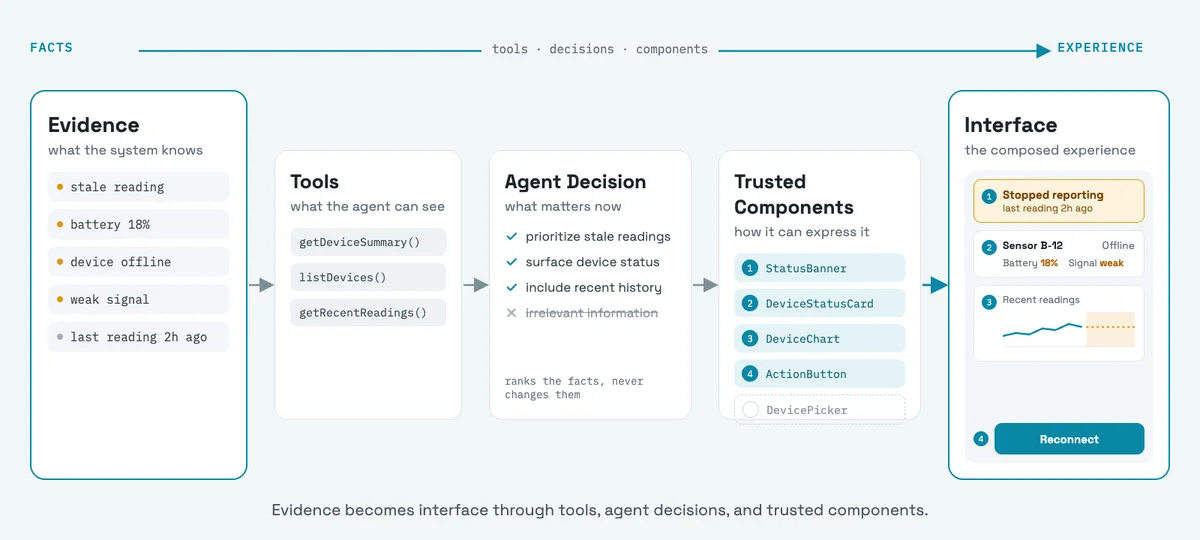
From Evidence to Interface
Device data becomes tools, tools become decisions, and decisions become UI.
A sensor reading, battery level, connectivity state, or timestamp starts as raw system data. Tools turn that data into structured evidence the agent can understand.
The agent then decides which evidence matters for the current situation.
Maybe a healthy device only needs a compact status card. A device with stale readings may need a warning, a chart, and a suggested action. The underlying data is different, so the composed interface is different too.
The path is simple:
Evidence → Tools → Decisions → Interface
The important part is that the model is not changing the facts. It is changing how those facts are surfaced.
Keep the Facts Deterministic
Measurements, thresholds, and device state stay in code. The model decides what matters.
The model should not calculate whether a battery is low, decide if a reading is stale, or infer whether a device is online. Those rules belong in deterministic code, where they can be tested, reviewed, and trusted.
Instead, the agent receives already interpreted facts such as batteryStatus: low, connectionState: offline, or readingStatus: stale.
Its job starts after that.
Given those facts, the agent can decide which ones deserve attention, which components should surface them, and how much context the user needs.
This keeps business logic predictable while still allowing the interface to adapt at runtime.
Code determines what is true. The model determines what is relevant.
Surface Evidence. Don’t Invent Causes.
Show what the system knows, not what the model guesses.
If a device stopped reporting, the agent can surface the last successful reading, connection state, battery status, signal quality, and recent history.
What it should not do is jump from those facts to an unsupported explanation.
A stale sensor does not automatically mean a dead battery. A weak signal does not prove a connectivity failure. Missing data does not tell you why the device stopped reporting.
When a cause is known, show it. When it is not, show the evidence. For example, if a device is offline with weak signal strength, show both facts. Do not claim the weak signal caused the disconnect unless the system actually knows that.
The agent should make the evidence easy to see and keep confirmed system knowledge clearly separated from possible explanations.
What Comes Next: Designing Better Agents
If tools and components shape the agent, the next step is learning how to design them well.
What should become a tool? How much context should a tool return? Which decisions belong in code, and which ones should be left to the model? How specific should a component be?
These choices define what the agent can see, how it can reason, and how it can respond through the interface.
A good GenUI experience is not only about having a capable model. It depends on giving that model the right capabilities, the right boundaries, and the right vocabulary. That is where agent design begins.
Related Topics
About the Author

Mario Corzo
Senior Mobile Developer
Senior Mobile Developer with 10+ years of experience building cross-platform applications across mobile, web, and gaming. Specialized in Flutter, BLE-connected mobile apps, and over-the-air firmware update flows for IoT systems. At Croxel, Mario bridges firmware and user experience to deliver intuitive interfaces for connected devices.
Mario Corzo has written 2 articles for Croxel Insights.